Travel agency software features
Parvaz is one app for the daily work of a small travel agency: make the ticket, tell the customer, record the money, and keep the team together. Here is everything it does, with a page for each part.
What you get
E-tickets from a photo, PDF or text
Add a booking photo, PDF or pasted text and AI fills the passengers, flights and fare for you to check. See the e-ticket and receipt generator.
Designs and your own branding
Seven ticket layouts with your agency name, logo, QR code and barcode. See all the ticket designs.
Share links and QR codes
Send the customer a link or a QR code that opens a locked copy of the PDF in any browser, with no app and no account. Turn off your branding and prices for tickets you pass to other agencies: white-label e-tickets.
WhatsApp message maker
Booking details, ticket confirmations, price offers, payment reminders and flight change notices, written in your customer's language and ready to send. See WhatsApp messages for travel agents.
PNR to itinerary
Paste booking lines with a PNR and get a clear itinerary a traveller can read. See PNR to itinerary and the flight itinerary maker.
Passport scanner and people
Photograph passports and IDs, up to 30 files at a time, and the details go to your address book without retyping. See the passport scanner.
Accounts and reports
Sales, supplier purchases, payments and expenses in any currency, with customer statements and profit reports. Export to PDF, Word or Excel. See travel agency accounting software and the invoice template.
Clean documents
Turn a photo, scan, PDF, Word or Excel file into a tidy document you can restyle, translate and export. The file is not stored.
Ask Parvaz assistant
Ask a question about your own tickets, people and payments, or about how to use the app. It prepares changes and you confirm them.
Team in real time
Changes show up for everyone at once. Discussions with replies, reactions and voice messages keep the team in one place.
Works offline
Make tickets and enter records with no internet. Parvaz saves on your device and syncs when you are back online.
Roles and security
Manager, agent and viewer roles, sign-in with PIN, password or passkey, and sign-in lockouts. See security.
Android, iPhone and web
Use Parvaz on Android, on iPhone and iPad, or in a browser on Windows and Mac. See download.
Languages
The app is in English, Dari and Pashto. Messages and documents can be written in 13 languages, so your customers read their own.
Hajj and Umrah agencies
Groups, passports and payment follow-up in one place. See software for Umrah and Hajj agencies.
Guides and pricing
Short how-to guides are in the guides. One plan with all features is on the pricing page.
How it works
Real screens from the app, step by step.
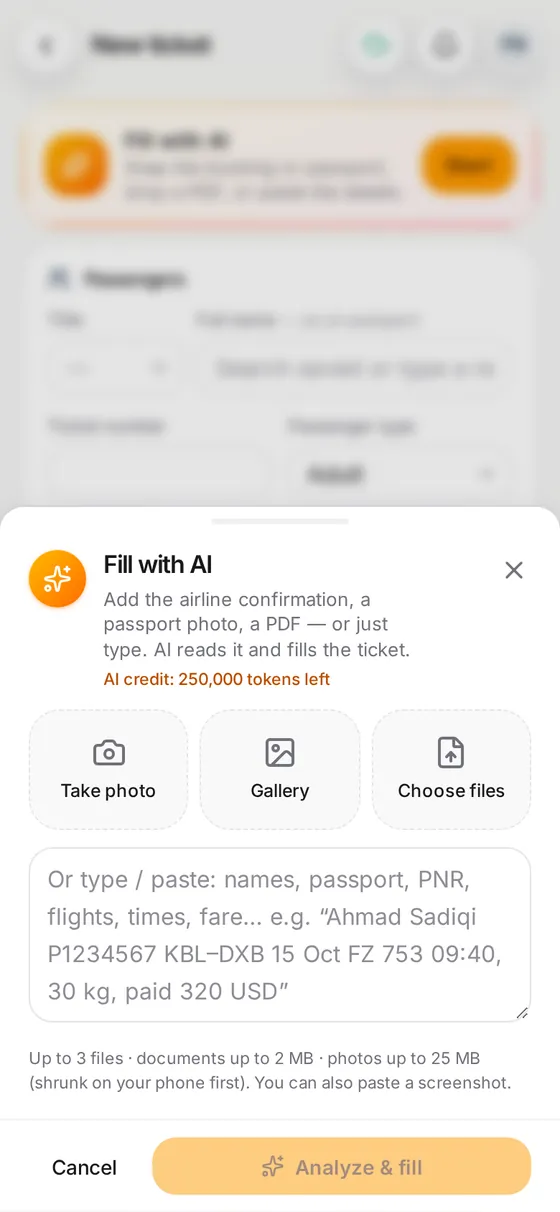
1. Add the booking
Paste the booking text or add a PDF or photo.
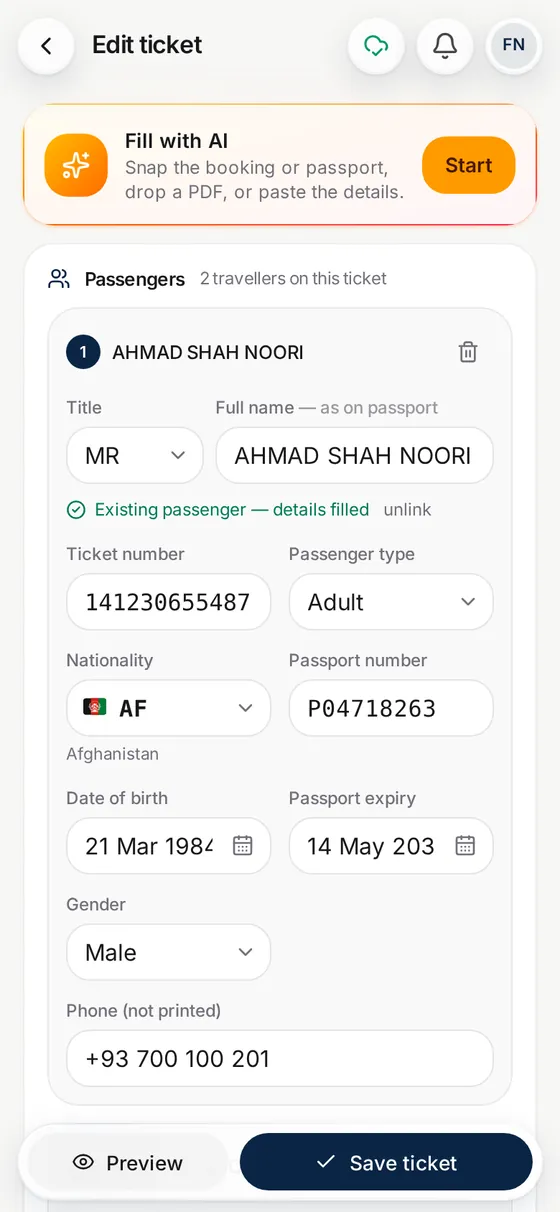
2. Check what AI filled
Passengers, flights and fare are filled in. Fix anything and save.
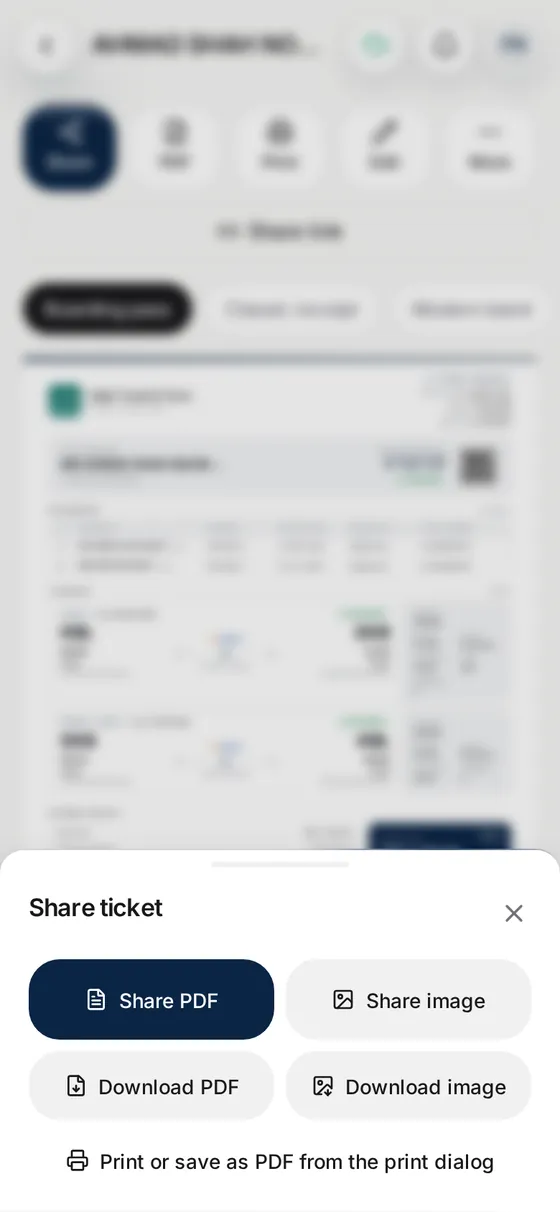
3. Send it and record the sale
Share the ticket, write the WhatsApp message, and the sale is booked in your accounts.
Questions
What is Parvaz?
Parvaz is an app for small travel agencies. It makes e-tickets and receipts, writes customer messages, keeps your accounts and people, and works on phone and web. Read more on the about page.
Does Parvaz issue airline tickets?
No. Parvaz does not issue tickets and does not connect to an airline booking system. It documents the bookings you make with the airline or your supplier.
Which features need AI?
Reading a booking from a photo or PDF, the passport scanner, clean documents, the assistant and the message maker use AI credit. Every new account starts with free credit, and you always check the result before you save.
Does it work without internet?
Yes. Records are saved on your device first and sent when the internet is back.
Which devices can I use?
Android, iPhone and iPad, and any modern browser on Windows or Mac. Your team sees the same records on all of them.
Which languages does it support?
The app is in English, Dari and Pashto. Messages and documents can be written in 13 languages.
How many staff can I add?
The plan includes unlimited staff, each with a role of manager, agent or viewer. Prices are on the pricing page.